
How to Analyze Competitor Websites Without SEO Skills
A step-by-step guide to identify rivals, inspect site traffic and tech, evaluate messaging, and turn findings into quick, actionable wins—no SEO skills required.
Analyzing competitor websites doesn’t require advanced SEO knowledge. With simple tools and a structured approach, you can uncover their strategies, traffic sources, and technology to refine your own business tactics. Here’s how:
- Identify competitors: Use Google searches, industry directories like G2 or Capterra, and tools like Crunchbase to find 3–5 key rivals.
- Compare websites: Tools like Competitor Analysis Tool highlight traffic gaps and messaging differences quickly.
- Analyze traffic sources: SimilarWeb shows where competitors get visitors - organic, paid, or direct - and their top-performing pages.
- Check technology: BuiltWith reveals the tech stack behind their sites, including CMS, plugins, and analytics tools.
- Review messaging: Study headlines, CTAs, and user flows to spot strengths and weaknesses.
- Create an action plan: Organize findings into opportunities and prioritize quick wins, like improving your homepage messaging or targeting untapped keywords.
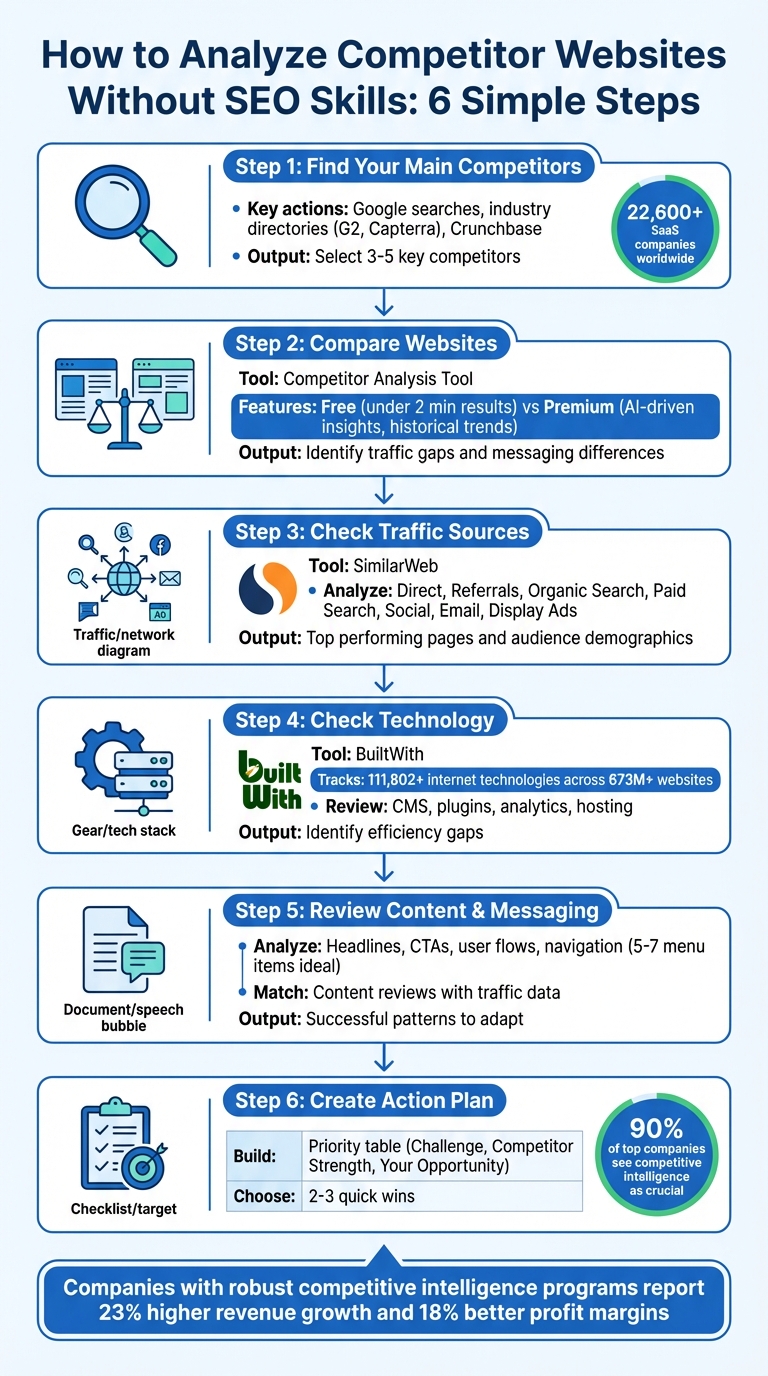
6-Step Competitor Website Analysis Process for Non-SEO Experts
How To Conduct A Competitor Analysis (& Useful Tools)
Step 1: Find Your Main Competitors
Before diving into competitor analysis, you need to identify who they are. With over 22,600 SaaS companies worldwide spread across 800+ software categories, narrowing your focus is crucial.
Search Google for Industry Keywords
Start by searching Google for keywords that describe the specific problem your software solves (e.g., "user onboarding software"). Focus on the problem, not company names.
For example, a December 2021 search for "user onboarding software" highlighted Appcues, Userpilot, Apty, and Userflow as key competitors - they appeared in both paid ads and organic results. Similarly, searching for "rank tracking" brought up Link-Assistant, Ahrefs, Rank Tracker, Spyfu, and SEMrush as competitors for that feature.
To dig deeper, use the related: operator in Google (e.g., related:salesforce.com). This can quickly reveal competitors. Search 3–5 key terms for each topic and note which domains consistently rank at the top - these are your real competitors.
Once you've gathered initial results, cross-check them with industry directories.
Check Industry Directories and Related Sites
Industry directories are another great way to identify competitors. Platforms like G2, Capterra, and Gartner Peer Insights list top-rated alternatives and can help validate your findings.
Other tools include Crunchbase, which has a "Similar Companies" tab that uses funding and market data to suggest competitors. On LinkedIn, the "Pages people also viewed" section on company profiles can also point you toward similar organizations. Don’t stop at your own profile - explore competitors’ pages to uncover even more potential rivals.
Additionally, check SaaS marketplaces like the Shopify App Store, Slack App Directory, or Salesforce AppExchange. These platforms often feature both major players and up-and-coming competitors in your niche.
Select 3–5 Key Competitors
Once you’ve gathered enough data, narrow your list to 3–5 direct competitors that target the same audience. Direct competitors compete for the same customers, while indirect ones solve similar problems but for slightly different markets. Start by focusing on your direct competitors - they’re the ones vying for the same customers as you.
Why does this matter? Companies with robust competitive intelligence programs report 23% higher revenue growth and 18% better profit margins. Knowing your competition is a strategic advantage you can’t afford to skip.
Step 2: Compare Websites with Competitor Analysis Tool
After pinpointing your 3–5 main competitors, the next logical move is to evaluate their websites against yours. This is where the Competitor Analysis Tool proves invaluable. It highlights gaps in demand, visibility, and messaging - all without requiring any prior SEO knowledge.
This tool treats websites as measurable economic entities, replacing guesswork with structured data. You'll gain insights into which intent clusters your competitors dominate, how their traffic is distributed across direct, organic, and paid channels, and how their messaging evolves over time. Plus, the free analysis plan provides instant, actionable metrics to help you get started.
Get Quick Results with Free Analysis
The Free Analysis plan is designed for speed, delivering results in less than two minutes. Simply input your website and a competitor's URL, and the tool will identify high-level gaps in demand and visibility. For instance, you can quickly see whether your competitor relies more on direct traffic (indicating strong brand loyalty) or paid traffic (suggesting a reliance on advertising). If you’re looking for deeper, more nuanced insights, the Premium Analysis plan adds extra layers of data.
Access Advanced Data with Premium Analysis
For those seeking a more thorough understanding, the Premium Analysis plan offers detailed benchmarking and tailored growth recommendations. It tracks historical trends and monthly messaging shifts using AI-driven insights. Premium users also gain access to conversion friction analysis, which reveals whether competitors use streamlined signup processes for speed or more complex forms to qualify leads. These insights can help you refine your own lead segmentation and conversion strategies. Even without advanced expertise, this plan makes it easy to turn data into actionable growth strategies.
Free vs. Premium Plans Comparison
| Feature | Free Analysis Plan | Premium Analysis Plan |
|---|---|---|
| Speed | Results in under 2 minutes | Real-time monitoring |
| Data Depth | Basic traffic and visibility overview | In-depth benchmarking and historical trends |
| Gap Identification | Simple identification of top-level gaps | Detailed growth and messaging recommendations |
| AI Insights | Not included | AI-driven visibility and sentiment tracking |
The free plan is ideal for quick assessments, while the premium plan offers the depth needed for ongoing, data-driven competitive analysis. Whether you’re just starting out or looking to fine-tune your strategy, there’s an option to meet your needs.
Step 3: Check Traffic Sources with SimilarWeb
Once you've compared competitors' websites, it's time to dig deeper into their traffic sources using SimilarWeb. This tool helps you uncover where your competitors' visitors are coming from. SimilarWeb categorizes traffic into six main channels: Direct, Referrals, Search (both Organic and Paid), Social, Email, and Display Ads. By analyzing this, you can see whether a competitor leans heavily on brand recognition, paid ads, or organic content to attract visitors. You can also explore specific pages to understand what’s driving their traffic.
Review Traffic Overview and Sources
To get started, enter a competitor's domain into SimilarWeb’s search bar. You'll instantly see their monthly traffic volume and a breakdown of traffic sources. For example, data from Amazon.com showed that 52% of its traffic came from Direct, 25% from Organic Search, and 10% from Paid Search. This highlights Amazon’s strong brand loyalty and investment in advertising.
SimilarWeb also provides engagement metrics like average session duration and bounce rate. Amazon’s bounce rate, for instance, was around 34.2%, meaning nearly two-thirds of visitors interacted with multiple pages. High Direct traffic typically reflects strong brand recognition, while a noticeable Paid Search percentage suggests a focus on advertising and potentially profitable keywords worth investigating.
Find Top Performing Pages
After assessing overall traffic sources, take a closer look at the pages driving the most visits. SimilarWeb's "Top Pages" feature highlights the URLs that generate the most traffic for your competitors. These could include blog posts, product pages, or pricing pages that resonate with their audience.
For example, if a competitor's pricing page sees substantial traffic, it might indicate strong purchase intent from visitors. Pay attention to trends - like educational guides or case studies - that seem to engage their audience. Additionally, check the "Top Referring Websites" section to discover which blogs, directories, or news platforms are sending traffic to your competitors. These could represent potential collaboration or backlink opportunities for your own site.
Use Audience Demographics for Planning
Understanding who visits your competitors’ websites adds another layer of insight. SimilarWeb’s "Demographics" and "Geography" features reveal important details like age, gender, and the countries contributing the most traffic. For instance, if 80% of a competitor’s visitors are from the United States, it’s clear they’re targeting a domestic audience.
The "Audience Interests" tool can also show you other websites their visitors frequent, offering clues about their broader preferences. This information helps identify advertising opportunities or potential partnerships.
"Understanding your competitors' target market will change the way you strategize. It not only enhances your marketing approach, but also identifies market gaps and strengthens your competitive advantage".
Lastly, don’t overlook device usage data. Knowing whether visitors prefer desktop or mobile can guide you in optimizing your site’s design and user experience. These insights will seamlessly prepare you for the next step: analyzing the technology behind competitors’ websites.
Step 4: Check Competitor Technology with BuiltWith
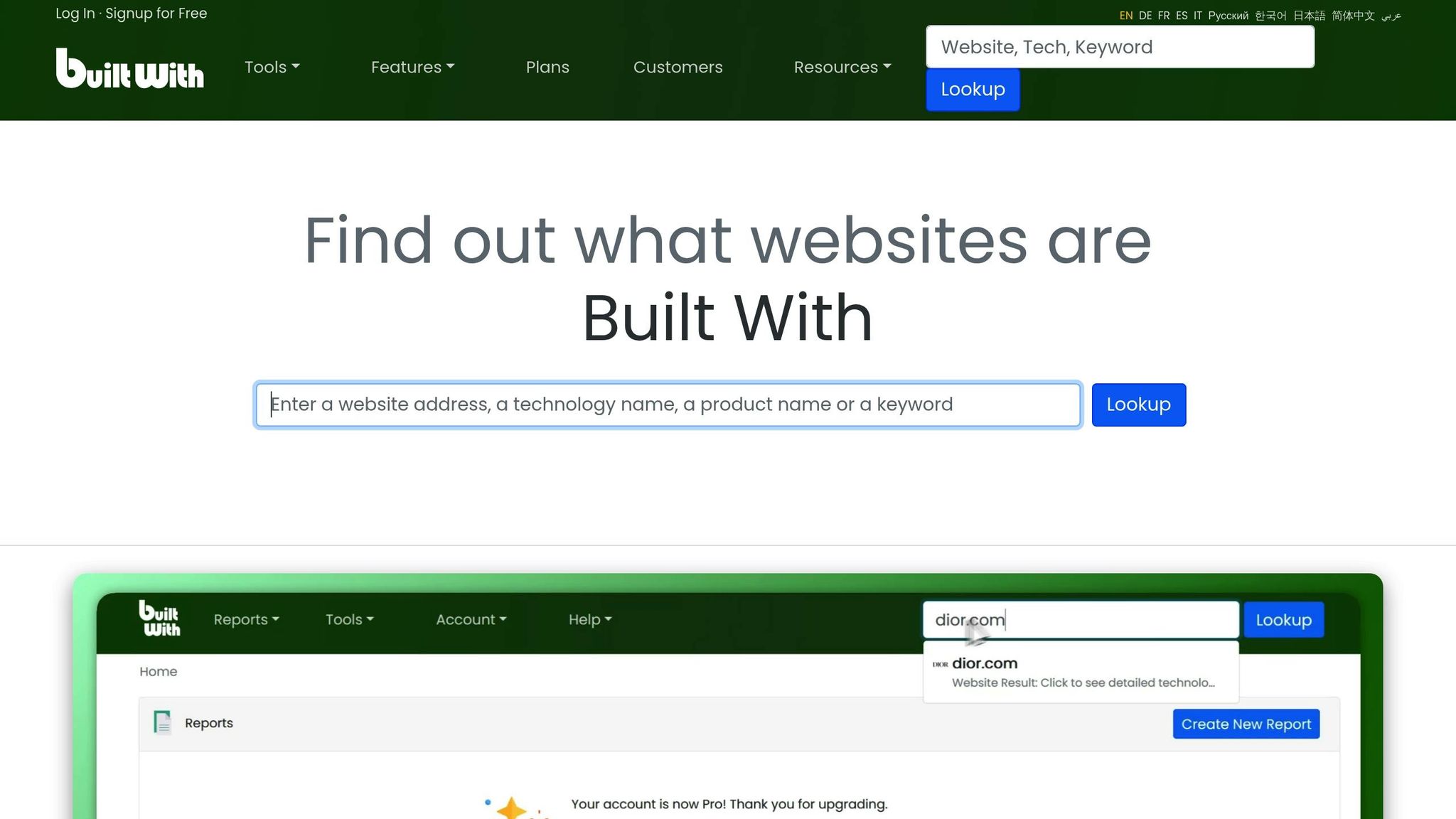
After analyzing traffic, the next step is to uncover the technology behind your competitors' websites. BuiltWith provides a detailed look at the tools and platforms powering any site, including their content management system (CMS), plugins, analytics tools, and hosting providers. This information can give you a clear picture of your competitor's operational setup and highlight areas where you can gain an edge. BuiltWith tracks over 111,802 internet technologies across more than 673 million websites.
Review Competitor Technology Choices
To get started, simply enter a competitor's URL on builtwith.com. The platform will break down their tech stack into categories like CMS, e-commerce tools, infrastructure, and marketing software. For even quicker access, you can use the BuiltWith browser extension for Chrome, Firefox, or Edge, which allows for one-click analysis while you browse.
For example, discovering that a competitor uses Shopify with upselling apps and email marketing plugins can provide insight into their conversion strategy. BuiltWith's free plan offers basic lookups, while paid plans - starting at $295 per month - unlock advanced features like lead generation and historical tracking. With this data, you can pinpoint areas where your competitor may be vulnerable or inefficient.
Identify Efficiency Gaps
Once you've gathered the tech report, start looking for inefficiencies in your competitor's setup. If they rely on a complex JavaScript framework like Angular or use outdated software versions, it might lead to slow mobile load times or potential security risks. These weaknesses could be an opportunity for your SaaS to shine as a faster and more secure alternative.
Cost inefficiencies are another area to examine. For instance, if a competitor spends heavily on premium enterprise tools, such as high-end live chat software, evaluate whether similar results could be achieved with more affordable solutions to improve your profit margins. Additionally, watch for sites overloaded with tracking pixels or redundant plugins that hurt performance. This kind of analysis can guide your strategy, helping you position your product as a leaner, faster, and more reliable option.
"The secret sauce is in the tech stack, and thankfully, you don't need to be a hacker to uncover it".
Step 5: Review Content and Messaging
Once you've evaluated traffic sources and technology, it's time to focus on your competitors' messaging and user experience. This step is all about observing and analyzing. By studying elements like headlines, calls-to-action (CTAs), and user flows, you can uncover strategies that directly influence conversion rates. Interestingly, clear and concise value propositions alone can significantly boost conversions, even without altering the design. This analysis ties together insights from earlier steps to give you a comprehensive view of your competition.
Analyze Headlines, CTAs, and User Flows
Begin by looking at the hero sections of your competitors' homepages - this is the first thing visitors encounter. Does the headline clearly communicate the target audience, the problem being solved, and the desired outcome in a single sentence? For instance, compare "Help SaaS teams reduce churn with automated customer insights" to the vaguer "Transform your business with next-generation solutions". The former is more actionable and specific.
Next, examine the site’s CTAs. Are they straightforward? Are they scattered or strategically placed? Pay attention to the signup process - does it only ask for an email, or does it require additional fields? A streamlined onboarding process can accelerate user activation, while more detailed forms might attract high-intent leads.
Navigation is another critical area. Keep an eye on the number of primary menu items - five to seven is ideal for reducing bounce rates. Trace the user journey from the homepage to product or service pages. Is the flow smooth, or do you notice areas where users might get stuck?
Match Content Reviews with Traffic Data
Take your content review a step further by integrating traffic data. Pinpoint the pages that drive the most engagement and assess their messaging. For example, if a competitor’s pricing page ranks as a top landing page, study how they present their pricing. Pricing framed around outcomes - like usage-based or performance-based metrics - often resonates better with customers than simple feature lists.
On the flip side, check the top exit pages to identify where competitors lose their audience. These insights can reveal weak points in their strategy.
Apply Successful Patterns to Your SaaS
After identifying effective strategies from competitors, adapt them to your own context. Combine these messaging insights with your findings from traffic and technology analyses to refine your approach. For instance, if you notice competitors shifting from the term "tool" to "platform", it may indicate a move toward broader market positioning. In today's business climate (2025–2026), messaging trends lean more toward measurable outcomes like "ROI, efficiency, and automation" rather than abstract promises of "transformation". Adjust your messaging to align with this results-driven narrative.
To keep track of recurring themes, create a simple SWOT (Strengths, Weaknesses, Opportunities, Threats) chart for your top 3–5 competitors. This will help you identify trends and opportunities for differentiation.
Step 6: Create an Action Plan from Your Findings
You've analyzed traffic patterns, technology use, and messaging strategies. Now it’s time to take those insights and turn them into actionable steps. The key to growth lies in how quickly you can move from analysis to execution - spotting patterns and immediately responding to them. In fact, over 70% of marketers rely on data insights to guide their decisions, and companies utilizing competitive intelligence report an average 8% increase in profits. Let’s break down how to put your findings into action.
Build a Simple Priority Table
Start by organizing your findings into a straightforward table with three columns: Challenge Area, Competitor Strength, and Your Opportunity. This method helps you clearly identify where competitors excel and where you can step in.
For instance:
- If a competitor ranks highly for high-intent keywords but their homepage messaging is unclear, you’ve found two opportunities: improve your own keyword targeting and refine your homepage copy.
- If their content hub features in-depth guides but misses a niche topic, that’s your chance to fill the gap.
- If their conversion process involves a multi-step form with excessive fields, you can simplify yours to a single-field email signup and improve lead capture.
Focus on tangible data like traffic numbers, pricing strategies, and conversion rates. For example, if a competitor ranks on page two for valuable keywords but with weak content, you can create higher-quality material and quickly overtake them.
Once your findings are structured, prioritize which areas require immediate attention.
Choose 2-3 Quick Wins
To make an impact quickly, identify 2-3 actionable opportunities.
Some high-impact examples include:
- Refining your hero section messaging if competitors rely on vague or generic language.
- Targeting commercial keywords where competitors rank but you currently don’t.
- Reducing friction in your signup process. For example, if your competitor asks for extensive qualification data upfront while you only request an email, you’ll likely capture more leads right away.
Group your insights by their effect on awareness, engagement, purchase intent, or conversion. For immediate results, focus on purchase intent and conversion opportunities - these target users who are already close to making a buying decision.
In today’s resource-conscious environment, messaging that highlights "ROI, automation, and efficiency" resonates much more than vague promises of "transformation". Use these data-backed strategies to sharpen your SaaS approach and drive measurable results.
Conclusion
Main Points to Remember
You don’t need advanced SEO expertise to understand your competitors' strategies. Start by identifying key rivals, use simple tools to gather data, and turn those insights into actionable steps. Tools like Competitor Analysis Tool offer a quick comparison of your site against others - whether through free checks or more detailed premium options. SimilarWeb helps you uncover where competitors are getting their traffic, showing if they lean on paid ads or focus on organic growth. BuiltWith reveals the tech stack behind their websites, helping you identify opportunities to optimize your own. With this knowledge, you’ll be ready to make informed decisions.
Start Analyzing Today
Turn these insights into action. Here’s how: pinpoint your competitors, compare their sites, study their traffic sources, evaluate their technology, analyze their messaging, and develop a clear action plan. Each step builds on the last, helping you translate data into targeted strategies. In fact, 90% of top-performing companies see competitive intelligence as crucial to their success.
Start small - choose one competitor and run a quick analysis using the Competitor Analysis Tool. Add traffic insights from SimilarWeb to see where their efforts pay off, which messages resonate, and where gaps might exist. Find one actionable opportunity and execute it. In fast-paced SaaS markets, speed matters. The sooner you act, the closer you’ll be to turning insights into growth.
FAQs
How do I know which competitors matter most?
To get ahead in your industry, it’s crucial to pinpoint the competitors that actually matter to your business. Start by focusing on those that overlap with your target audience and align with your business goals. These are typically competitors with a strong foothold in your niche, noticeable growth, or a significant share of the audience you’re trying to reach.
Look closely at their traffic sources, content strategies, and engagement metrics. Are they dominating search results? Do they have a social media presence that keeps people coming back? These insights can help you understand how they attract and retain their audience - and what you might be able to replicate (or improve upon).
Prioritize competitors whose strategies offer lessons you can use and whose market share directly influences your opportunities. By analyzing their strengths and weaknesses, you can uncover ways to carve out your own space and make smarter strategic decisions.
How accurate are tools like SimilarWeb and BuiltWith?
Tools like SimilarWeb and BuiltWith offer estimates derived from aggregated data sources like ISPs and web crawlers. While they provide helpful insights into traffic trends, visitor demographics, and technology stacks, their data isn’t 100% accurate. These tools are ideal for getting a general sense of competitor performance rather than exact figures. Use their results as a guide, not as definitive metrics.
What should I do first after identifying a competitor gap?
Take a close look at the elements driving your competitor's website success. Pay attention to traffic sources, keyword rankings, content strategies, and user engagement. These factors often reveal what’s working for them.
Next, stack up their performance against your own site. This comparison helps you identify areas where you can improve - whether it’s targeting similar keywords, refining your content strategy, or improving user experience. By focusing on these insights, you ensure your efforts are both focused and based on actual data.