
How to Find Your Competitor's Top Keywords in 2026
Find competitors' top organic keywords, uncover visibility gaps, and use a 4-step SaaS SEO process to boost rankings and lower acquisition costs.

Want to beat your competitors in search rankings? Start by identifying their top-performing keywords. Here's why it matters:
- 53% of website traffic comes from organic search, which converts 8.5× better than outbound leads.
- SaaS CPC rates are rising 15–18% annually, making organic traffic a cost-effective growth strategy.
- Knowing competitor keywords helps you find gaps, lower acquisition costs, and boost revenue.
How to get started:
- Use a Competitor Analysis Tool to compare your site with 3–5 rivals.
- Focus on "Missing" and "Weak" keywords where competitors rank higher.
- Prioritize terms with moderate difficulty (KD% 30–49) and high search volume.
- Target high-intent keywords like "pricing", "alternative", or "vs."
With the right approach, you can turn competitor insights into actionable strategies that drive traffic and revenue.
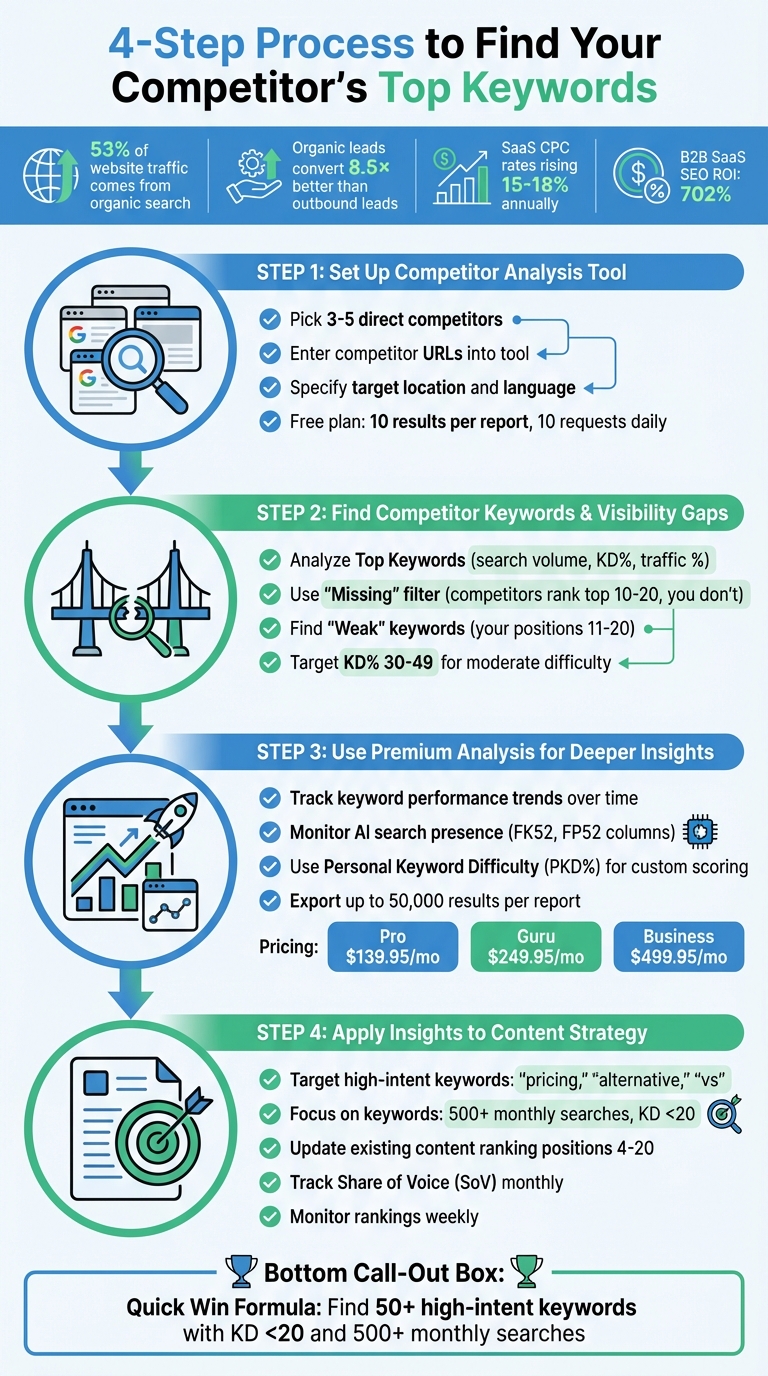
4-Step Process to Find and Use Competitor Keywords for SaaS Growth
How To Find Competitors' SEO Keywords So You Can CRUSH Them!
Step 1: Set Up Competitor Analysis Tool
You can set up this tool in just a couple of minutes, no SEO experience needed. By identifying competitors, entering their website URLs, and analyzing the results, you’ll quickly uncover visibility gaps and keyword opportunities. This step sets the stage for deeper insights in the process ahead.
Pick the Right Competitors to Analyze
Start by identifying competitors that rank for the keywords you’re targeting. These could include SEO competitors - websites ranking for your target terms, like industry blogs or media sites - or business competitors offering similar products to the same audience. For SaaS companies, focus on 3 to 5 direct competitors that align with your pricing model and Ideal Customer Profile (ICP). This ensures your analysis centers on keywords that drive revenue.
To find these competitors, search a few primary keywords in Google and note which sites consistently appear at the top. These are your SEO rivals. Many tools also feature a "Competitors" tab with a Competitive Positioning Map, which shows domains with similar traffic levels and topics. Pay attention to competitors with comparable Authority Scores and organic traffic - these are realistic targets for improving your rankings. Once you’ve identified the right competitors, input their URLs to begin your analysis.
Enter Competitor Websites into the Tool
Add the homepage URLs of your selected competitors into the tool’s search bar. Be sure to specify your target location and language (country/database), as search trends and keyword difficulty can vary widely between markets. For features like "Keyword Gap", you can input your domain alongside up to four competitor domains to compare results.
If competitor URLs aren’t available, you can use seed keywords to uncover ranking domains instead. Save these domains for easy access later.
What You Get with the Free Analysis
The Free Analysis plan offers a quick overview of each competitor’s performance. You’ll see metrics like their Authority Score, estimated organic search traffic, and the total number of keywords they rank for. It also highlights "Missing" keywords - terms your competitors rank for but you don’t - and provides insights into their top-performing content strategies.
With the free plan, you’ll get 10 results per report and can make up to 10 requests daily. This includes basic features like keyword visibility, traffic source mapping, and gap identification. You’ll also see recent position changes, such as "Lost" or "Declined" keywords, which could point to outdated competitor content you might outperform. These insights are a great starting point before upgrading to the Premium Analysis plan for more in-depth data.
Step 2: Find Competitor Keywords and Visibility Gaps
Once your setup is complete, the next step is to analyze competitor data to uncover keyword opportunities. This process helps SaaS businesses identify terms that drive traffic to competitors but not to their own site, providing a roadmap for targeting the right keywords based on your current position.
Find Your Competitors' Top Keywords
Start by exploring the "Top Keywords" section to see which terms are generating traffic for your competitors. Key metrics to focus on include:
- Search Volume: Indicates how often a keyword is searched monthly.
- Keyword Difficulty (KD%): Measures how challenging it is to rank for a term.
- Traffic Percentage: Shows how much of the competitor’s traffic comes from that keyword.
Aim for keywords with high search volume and moderate difficulty (KD% between 30 and 49). These offer a balance between traffic potential and competition, making them more attainable for sites without a high domain authority. Additionally, pay attention to Search Intent - whether it’s Informational, Commercial, or Transactional. This tells you what kind of content Google favors for each keyword. For example, if competitors are ranking with blog posts for informational queries, you’ll want to create similar content.
"Look at which pages and topics are driving the highest amount of nonbrand traffic to your competitors. This can reveal emerging trends that can be leveraged within your industry." - Nikki Brandemarte, Sr. SEO Strategist, NP Digital
These insights will help you pinpoint where your site is falling behind.
Identify Where Your Site Lacks Visibility
Leverage the Keyword Gap tool to compare your domain against up to four competitors at once. Use the "Missing" filter to find keywords where competitors rank in the top 10 or 20 results, but your site is absent.
You should also look for "Weak" keywords, where your rankings (positions 11–20) trail behind competitors. These are often referred to as "striking distance" opportunities, as they indicate you have some relevance but need stronger content to break onto the first page. Some tools also provide a "Traffic Lift" metric, estimating the potential monthly traffic gain if you surpass a competitor’s ranking. Focus on gaps with the highest traffic lift potential to make the most of your efforts.
Choose Which Keywords to Target First
Now that you’ve identified top keywords and gaps, prioritize which ones to target. Exclude branded terms - keywords tied to a competitor’s name - and rank the remaining keywords by search volume, difficulty, and relevance.
For newer or lower-authority SaaS sites, focus on keywords with a KD% below 30 for easier wins. If a high-priority keyword seems too competitive (KD% over 70), look for long-tail variations with similar intent but less competition. For example, instead of targeting "CRM software" (KD 85%), consider "CRM software for real estate agents" (KD 38%).
Before committing to any keyword, review the current SERP to ensure your content format - whether it’s a blog post, product page, or comparison guide - aligns with what Google is rewarding. This alignment ensures your content meets user expectations and search intent.
Step 3: Use Premium Analysis for Deeper Insights
Once you've gathered your initial keyword gap insights, Premium Analysis takes things to the next level by offering advanced, trend-focused data. By upgrading, you’ll gain access to features like historical data, AI search tracking, and metrics designed to support smarter, long-term strategies. These tools are available with the Guru plan ($249.95/month) and Business plan ($499.95/month), while the Pro plan ($139.95/month) provides only current, snapshot-based data without historical context.
Analyze Keyword Performance and Trends
Premium plans allow you to track keyword performance over time, offering a clearer picture of trends instead of relying solely on daily snapshots. For example, the "Trend" graph in Keyword Overview highlights seasonal spikes or dips in search interest, helping you decide where to focus your content efforts. Keywords with stable, year-round volume should take priority.
Another standout feature is the ability to monitor your domain's presence in Google’s AI-generated search results. By exporting data columns FK52 (total AI triggers) and FP52 (your domain's presence in those results), you can measure the impact of AI-driven zero-click searches on your traffic. This insight is crucial as organic search evolves.
Additionally, the Personal Keyword Difficulty (PKD%) metric customizes ranking difficulty based on your site’s authority rather than general market competition. For instance, if a keyword shows a KD% of 65 but a PKD% of 42 for your domain, it indicates a stronger chance of ranking well. This tailored scoring helps you avoid wasting time on overly competitive terms while identifying achievable goals. Armed with this data, you can move forward to uncover overlapping keywords for fresh growth opportunities.
Find Keyword Overlaps and New Opportunities
Premium Keyword Gap tools also let you uncover overlapping keywords, which can reveal untapped opportunities. By comparing your domain against up to five competitors simultaneously, you can identify "Missing" and "Untapped" keywords. The "Missing" tab highlights terms where all your competitors rank, but you don’t - these are proven topics with existing demand. For quick wins, focus on keywords with over 500 searches per month and a KD below 20.
The "Traffic Lift" metric estimates how many extra visits you could gain monthly by outranking a competitor for specific terms. SaaS companies, in particular, should prioritize high-intent keywords like "pricing", "cost", "alternative", "vs", and "review", as these often capture users in the decision-making phase. Many B2B SaaS teams uncover 50+ high-intent keyword gaps with KD under 20 using this approach.
"Organic traffic accounts for 53% of website visits and converts 8.5x better than outbound leads, so competitor gap analysis directly supports SaaS revenue growth." - Aaron Rovner, SaaS Hero
You can also dive deeper by analyzing competitors at the subfolder level (e.g., /blog vs. /blog) to identify gaps in educational content that may not be as obvious at the domain level.
Export Data for Your Marketing Plan
Once you’ve identified trends and opportunities, exporting your data is the next step in refining your marketing plan. Premium plans allow for 10,000 requests per day and up to 50,000 results per report on the Business tier, making large-scale analysis straightforward. Include columns like Keyword Difficulty (Kd), Search Volume (Nq), and Search Intent in your exports to help your team prioritize effectively. Filters - such as Search Volume >1,000 and Keyword Difficulty <60 - can help you zero in on high-value targets.
You can also automate reporting with monthly updates or API integrations. For example, use the =IMPORTDATA function or Google Apps Script to pull in CSV reports automatically, creating date-specific sheets (e.g., "March 2026") for ongoing benchmarking.
Finally, integrate these findings into actionable strategies. Export "Position Changes" reports to identify competitor keywords that have "Declined" or been "Lost", providing opportunities to create updated content and win their traffic. Additionally, generate a list of "Best" backlink prospects - sites linking to your competitors but not to you - to support a targeted link-building strategy.
Step 4: Apply Keyword Insights to Your Content Strategy
Use the competitor keyword data you've collected to create content that attracts the right audience and drives revenue. Focus on high-intent keywords that suggest users are evaluating options or considering a switch. Phrases like "[competitor] pricing", "[competitor] alternative", and "[competitor] vs [your brand]" are particularly effective because they target users in the decision-making stage.
Create Content Around High-Value Keywords
Group your keywords into clusters based on proven topics. For instance, if you've found that competitors rank well for "project management software for remote teams", you could develop a detailed guide on that subject. Make sure your content format aligns with the search intent visible in the SERPs. If the top-ranking pages are product comparison pages, a generic blog post likely won’t perform as well.
Look for "missing" and "untapped" keywords where competitors dominate traffic. Focus on terms with a search volume above 500 and a Keyword Difficulty score under 20. With SaaS Cost Per Click (CPC) rates climbing 15% to 18% annually, organic content creation is becoming a more cost-effective alternative to paid advertising.
Study your competitors’ title tags and headings to identify secondary keywords and related subtopics. Instead of simply mirroring their approach, take it a step further with the "10x Content" method. Add original research, unique data, or new subtopics to make your content stand out.
Don’t forget to revisit your existing content to maximize its potential.
Update Existing Content for Better Rankings
Refreshing existing content can yield quicker results than creating new pages. Use the "Weak" filter in your keyword gap analysis to find terms where your site already ranks but competitors are ahead. Keywords in positions 4–20 are often "quick wins" since your site already holds some relevance for those terms.
Prioritize updates using the Traffic Lift metric, which estimates the potential increase in monthly visits if you surpass a competitor. Enhance these pages by adding long-tail FAQ sections that use question-based queries like "competitor name + pricing" to attract high-intent traffic. Structuring your content with bulleted lists or Q&A formats can also help you snag Featured Snippets and "People Also Ask" placements.
"If a rival ranks for a keyword you don't or that you rank poorly for, your site may not cover the topic well enough."
- Ana Camarena, Organic Content Lead, Semrush
Compare your title tags and meta descriptions with those of higher-ranking competitors. Make sure your tags include keywords early and use engaging modifiers. Check your site’s Core Web Vitals and page speed too - technical performance can tip the scales when content quality is similar.
Keep a close eye on these updates to ensure they’re driving improvements.
Track Performance and Adjust Your Strategy
Monitor keyword rankings weekly and set up automated alerts for drops in critical terms. Even a single-position drop for a high-volume keyword can have a financial impact. For example, one niche store lost an estimated $3,096 in potential revenue in just one day due to a drop in ranking for a single keyword.
Track your Share of Voice (SoV) monthly by comparing your estimated traffic to the total traffic for your shared keyword set. Aim for a 20% increase in SoV, as this often correlates with a lower Customer Acquisition Cost. Use keyword tags to organize by funnel stage, page type, or business priority so you can focus on the changes that matter most.
Reassess your competitor set every quarter to stay ahead of new players or shifting strategies. If rankings drop without any technical issues, revisit the SERP to see if search intent has changed - for example, from informational to commercial - and adjust your content accordingly. Also, keep an eye on keywords that trigger AI-generated summaries like Google AI Overviews to monitor your site’s visibility as search behavior evolves.
Conclusion
Figuring out your competitor's top keywords doesn’t have to be complicated. This guide's four-step approach - setting up your analysis, spotting visibility gaps, exploring advanced insights, and applying those findings to your content strategy - provides a clear path to boosting organic traffic while keeping acquisition costs in check. With SaaS CPC rates climbing every year, competitor keyword research is more than a smart move; it’s a necessity for long-term growth.
Key Takeaways for SaaS Growth
Here’s a quick recap of the most important strategies SaaS businesses can use to drive growth:
- Focus on identifying your true SEO competitors - the websites ranking for your target keywords, which may differ from your direct business rivals.
- Use tools like the Competitor Analysis Tool to conduct keyword gap analysis. Zero in on "Missing" and "Weak" keywords where competitors are winning and your site is falling short.
- Prioritize high-intent keywords, especially those with modifiers like “alternative,” “pricing,” and “vs,” as these attract users actively comparing solutions.
- For quicker results, aim for low-difficulty keywords (KD <20) with at least 500 monthly searches.
Once you’ve identified the right keywords, focus on creating top-notch content around keyword clusters and updating pages that already rank between positions 4–20. Keep a close eye on your Share of Voice monthly and track keyword rankings weekly - small ranking shifts can have a big impact on revenue. A great example? TripMaster generated $504,758 in Net New ARR in just one year by implementing a competitor-driven keyword strategy.
Try the Competitor Analysis Tool Today
Ready to put this strategy into action? The Competitor Analysis Tool makes it easy to uncover actionable insights in under two minutes. With the Free Analysis plan, you can compare your site with competitors, identify gaps, and start optimizing - all without needing SEO expertise or even a credit card. For more advanced features, the Premium Analysis plan offers detailed keyword data, export options, and tailored recommendations to seamlessly integrate findings into your marketing efforts.
Stop relying on guesswork. Use data to make smarter decisions and outrank your competitors. After all, organic leads convert 8.5x better than outbound leads, and B2B SaaS SEO delivers an impressive ROI of 702%. There’s no better time to start leveraging competitor keyword analysis.
FAQs
How do I choose the right competitors to analyze?
To find the right competitors to analyze, look for those targeting a similar audience and providing products or services like yours. Start by plugging your seed keywords into keyword research tools. These tools will help you pinpoint the top-ranking websites in your niche. Focus on competitors with high visibility and relevance to your market. Studying their strategies can reveal useful ideas to improve your SEO and content approach.
What’s the fastest way to prioritize “Missing” vs “Weak” keywords?
To decide between focusing on "Missing" or "Weak" keywords, consider their potential impact and the level of effort required. For "Missing" keywords, prioritize those with high search volume and strong relevance to your business goals. When it comes to "Weak" keywords, evaluate their current performance, the level of competition, and the possibility of improving their rankings. By analyzing factors like search volume, relevance, and ranking difficulty, you can quickly identify opportunities that deliver the greatest value and fine-tune your strategy for better results.
How do I tell if a keyword is worth targeting for SaaS revenue?
To figure out how well a keyword might drive SaaS revenue, look at three key factors: search volume, competition level, and conversion potential. The ideal keyword has solid demand, isn’t overly competitive, and fits your business growth objectives.
It's also crucial to understand the keyword's intent. Does it bring in users who are likely to become SaaS customers? Focus on keywords that strike a balance between high demand and realistic chances of driving traffic and revenue.