
7 Website Gaps Costing You Traffic Right Now
Fix seven website problems—from intent mismatch and missing conversion pages to technical SEO, weak links, and poor forms—that cost traffic and conversions.

Your website could be losing traffic and revenue due to common, avoidable issues. Here’s what’s holding you back:
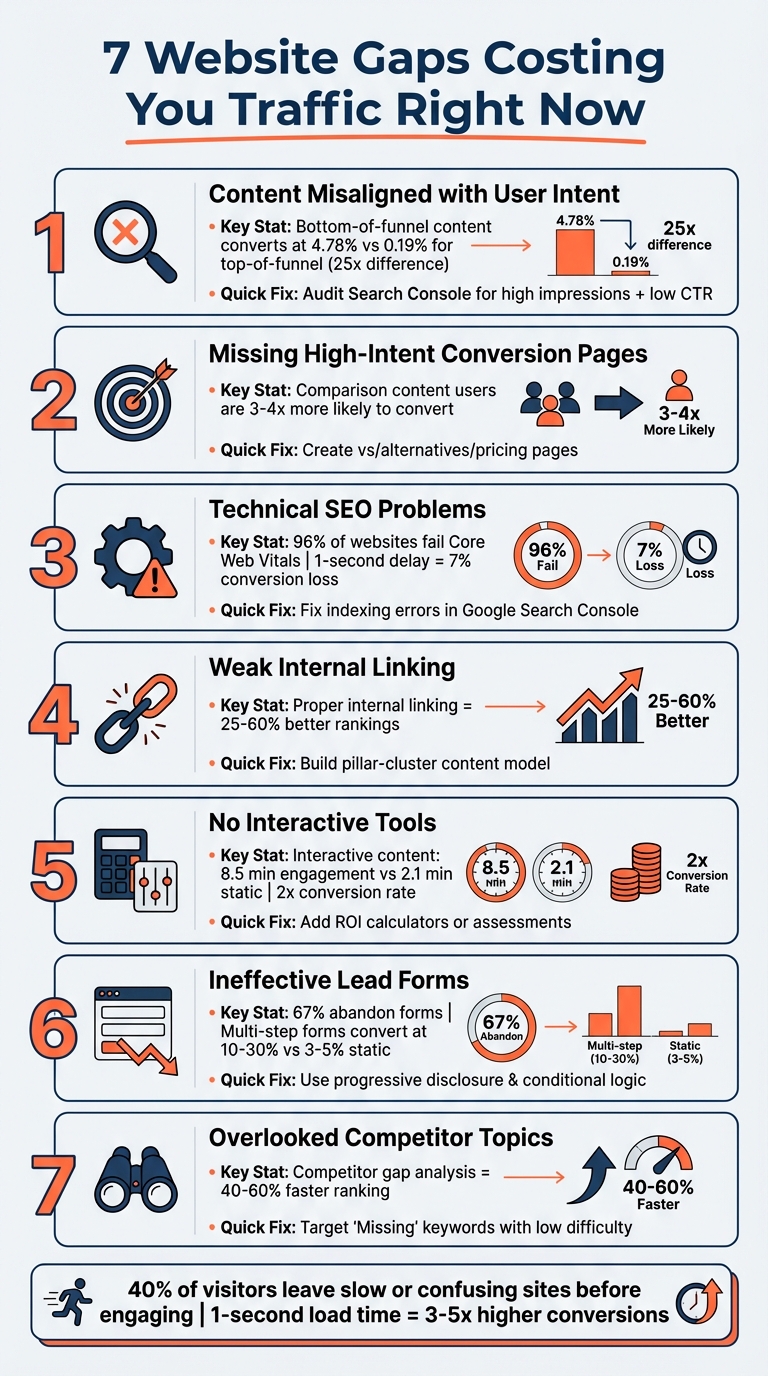
- Content Misaligned with User Intent: Pages fail to meet visitor needs, leading to low clicks and conversions.
- Missing High-Intent Conversion Pages: Lack of comparison, alternatives, and pricing pages for ready-to-buy users.
- Technical SEO Problems: Issues like slow load times, indexing errors, and missing structured data hurt rankings.
- Weak Internal Linking: Poor link structures make important pages hard to find for users and search engines.
- No Interactive Tools: Static content doesn’t engage visitors, while calculators or quizzes can double conversions.
- Ineffective Lead Forms: Long, generic forms frustrate users and reduce lead quality.
- Overlooked Competitor Topics: Competitors rank for keywords and topics you’re missing, stealing potential visitors.
Key fixes include aligning content with intent, resolving technical issues, improving internal links, adding interactive tools, and optimizing forms. Start with an audit of your top pages and focus on high-traffic, low-conversion areas. Addressing these gaps can transform your website into a stronger revenue driver.
7 Website Gaps Costing You Traffic and Revenue
3 Simple Steps We Used to Double SEO Traffic in 6 months | EP 2
Gap 1: Content That Doesn't Match User Intent
When your content doesn’t align with what users are looking for, it can push visitors away. You might see a spike in traffic but notice no conversions. Or, you might have pages with thousands of impressions in Google Search Console but barely any clicks. These are telltale signs that your content isn’t connecting with your audience. Experts often highlight this issue during audits.
One common mistake? Focusing only on keywords without considering intent. Dhruv Mehta, a SaaS SEO specialist, explains:
"I have audited SaaS sites where traffic doubled in six months, performance metrics improved yet demo requests remained low".
This disconnect often happens when content is created for the wrong stage of the buyer’s journey. For instance, crafting a beginner’s guide when users are actually searching for pricing comparisons.
Data supports this. In January 2026, Grow and Convert analyzed 64 articles for their client Geekbot. They found that bottom-of-funnel content converted at 4.78%, while top-of-funnel content converted at only 0.19% - a 25x difference. Even with 7x less traffic, high-intent posts delivered over three times the total conversions.
How Users Search at Different Stages
The misalignment often stems from how users search as they move through the buyer’s journey. These stages - awareness, consideration, and decision - each require a different approach.
- Awareness stage: Users are aware of a problem but not necessarily a solution. They search for queries like "how to detect payment fraud."
- Consideration stage: Here, users compare options, using searches like "best endpoint protection software."
- Decision stage: At this point, users are ready to choose and might search for terms like "[Brand] vs [Competitor]" or "[Brand] pricing".
The format of your content also matters. If the top 10 results for a keyword are all product pages and you’re publishing a blog post, you’re likely targeting the wrong intent. No surprise, then, that 92% of SEO professionals say aligning content with search intent is critical for ranking success.
| Intent Type | User Goal | Common Keyword Modifiers |
|---|---|---|
| Informational | Learning or finding an answer | How, What, Why, Guide, Tutorial |
| Navigational | Finding a specific site or page | Brand name, Login, Pricing page |
| Commercial | Researching/Comparing options | Best, Top, Review, vs, Comparison |
| Transactional | Ready to buy or take action | Buy, Order, Pricing, Subscribe, Signup |
Solution: Organize Content by User Intent
Fixing intent mismatches can lead to significant improvements in conversions. Start by auditing Google Search Console for pages with high impressions but low click-through rates (CTR). This often signals a mismatch between content and user intent. Then, use an incognito window to check the top 10 results for your target keywords. Pay attention to the type, format, and approach of the content.
Create separate pages for different user intents. For example, don’t combine "What is CRM" (informational) with "Best CRM software" (commercial) on the same page. Use Google’s "People Also Ask" feature to identify related questions your content should address, helping keep users engaged.
Finally, match your calls-to-action (CTAs) to the intent of the page. For informational content, use CTAs like "Learn More", while transactional pages should have CTAs like "Request a Demo."
A great example of this strategy comes from B2BMint. Between May 2025 and January 2026, they implemented a "pipeline-first" content framework for an Email Marketing SaaS client. By focusing on content clusters built around specific buying problems instead of broad, high-volume keywords, they achieved a 600% increase in qualified leads in just eight months.
Gap 2: Missing High-Intent Conversion Pages
If you’re not creating conversion-focused pages like comparisons, alternatives, and pricing, you’re leaving a lot of potential on the table. These pages are specifically designed to engage users who are in the final stages of their decision-making process - people who already know what they need and are deciding between vendors.
The data backs this up. Users engaging with comparison content are 3–4 times more likely to convert compared to those reading general informational content. Similarly, SaaS comparison pages outperform standard blog posts, converting at 2–3 times the rate.
Pages That Attract Ready-to-Buy Visitors
Comparison and alternative pages are magnets for high-intent buyers. These pages either directly compare your product to competitors or appeal to users actively looking to switch from another solution.
Your pricing page is another critical touchpoint. As DesignRevision explains:
"Your pricing page is the highest-intent page on your SaaS website. Visitors who reach it have already decided they are interested".
The stats are compelling: the median conversion rate for SaaS pricing pages is 3.8%, but well-optimized pages can hit 8–12%. Small tweaks can drive big results - adding a monthly/annual billing toggle can boost annual plan signups by 25–35%, while placing social proof near call-to-action buttons can increase conversions by 10–20%.
These examples highlight the importance of building pages that directly capture high-intent traffic.
Solution: Build Pages for High-Intent Keywords
To attract these ready-to-buy visitors, focus on keywords with commercial and transactional intent. Use modifiers like "vs", "alternatives", "best", "comparison", and "reviews". Work with your sales and customer success teams to uncover the most common competitor objections and the features prospects care about the most.
For comparison pages, add a summary comparison table near the top. This helps users quickly find the information they need before diving deeper into the details. Transparency is key - acknowledge where competitors might excel. Surprisingly, being upfront about this can boost your credibility and improve conversion rates.
Consider the example of Teamwork, a project management software company. In January 2025, they partnered with GetUplift to revamp their product comparison page. By combining detailed product data with emotionally engaging messaging, they achieved a 54% increase in conversion rate.
For pricing pages, adopt a three-tiered pricing structure to prevent choice overload. Highlight the most popular option with a badge, a technique that can result in a 69% higher conversion rate for that specific plan. Organize features into value-driven categories like "Collaboration" or "Security" instead of listing them all at once. These strategies make it easier for visitors to see the value and take action.
Gap 3: Technical SEO Problems
Even if your content is outstanding, technical issues can quietly sabotage your search rankings. These problems often operate under the radar, choking off traffic and revenue without any obvious signs. As SEO expert Tushar Pol explains:
"Technical SEO underpins your overall SEO success. Because many of these activities need to occur before your other SEO tactics have a chance of driving results."
The data paints a concerning picture. 96% of websites fail at least one Core Web Vitals assessment, and 69.32% have orphan pages - pages with no internal links, making them invisible to search engine crawlers. Chances are, your site could be affected by similar issues.
Common Technical Issues That Hurt Rankings
The most impactful technical problems generally fall into three key areas: indexing errors, slow load times, and missing structured data.
Indexing issues are more common than many realize. For instance, 50% of websites have pages blocked by a "noindex" directive, often due to oversight. Other culprits include canonical tag conflicts, JavaScript rendering problems, and redirect chains. When Google can't properly crawl and index your pages, your content won't rank - no matter how good it is. As seoClarity puts it:
"As far as Google is concerned, if your pages aren't indexed, they don't exist - and they certainly won't be found on the search engines."
Page speed is another major factor. A 1-second delay in page load time can slash conversions by 7%, while a jump from 1 to 5 seconds increases bounce rates by 90%. Google’s John Mueller has also noted that server response times over 1,000ms can limit how many pages Google can crawl.
Finally, schema markup is often overlooked. Only 17% of the top 10 million websites use any form of schema. Without it, you're missing out on rich search results that can boost click-through rates.
Addressing these technical challenges is essential before you can fully capitalize on your content.
Solution: Fix Core Technical Issues
Your first stop should be Google Search Console (GSC). The "Pages" report identifies URLs excluded from the index and explains why - whether it's a noindex tag, a canonical conflict, or a crawl error. Systematically resolving these issues should be your top priority.
For page speed, focus on optimizing your Largest Contentful Paint (LCP). Use fetchpriority="high" for hero images, convert images to WebP or AVIF formats to reduce file sizes by 25–50%, and implement a Content Delivery Network (CDN) to cut Time to First Byte (TTFB) by 60–80%. If your site relies heavily on client-side rendering, consider switching key content areas to server-side rendering (SSR) to ensure faster indexing.
Clean up your XML sitemap so it includes only live, canonical URLs with a 200 status code. Adding self-referencing canonical tags to each page can also prevent duplicate content issues. These steps can make the difference between a page that ranks and one that's invisible.
Next, we'll dive into how internal linking structures can further influence your site's performance.
Gap 4: Weak Internal Linking
Even if you've nailed the technical aspects of SEO, a weak internal linking structure can still undermine your efforts. Without strong internal links, your most valuable pages can remain hidden from both users and search engines. Internal links are like a roadmap - guiding visitors and search engines to the content that matters most. Without them, your top-performing pages might not get the recognition they deserve.
Why Internal Links Matter for SEO
Google's John Mueller didn't mince words when he said:
"Internal linking is super critical for SEO. It's one of the biggest things you can do on a website to guide Google and visitors to the pages that you think are important."
Internal links serve two key purposes. They pass link equity (PageRank) from authoritative pages to those that need a boost, and they signal to search engines which pages are most important and how topics connect. Without these pathways, your high-priority pages - like pricing, product features, or landing pages - might not perform well, even if your homepage attracts plenty of backlinks.
There's also the issue of crawl depth. Pages buried more than three clicks away from your homepage are less likely to be crawled regularly, making it hard for them to rank effectively. This is a common problem for SaaS websites, where essential pages like feature overviews or integration guides often go unnoticed by Google. The stats are clear: improving internal linking can lead to 25–60% better rankings and up to 30% more pages being indexed. A well-thought-out internal linking strategy can make a measurable difference in your site's performance.
Solution: Build a Solid Internal Linking Framework
The pillar-cluster model is a proven strategy to strengthen internal linking. Start by creating a central pillar page that focuses on a broad topic. Then, link it to several related cluster pages. For SaaS websites, feature pages often serve as pillars, while supporting content like tutorials, use cases, or integration guides act as clusters. Make sure these cluster pages link back to the pillar page, forming a loop of authority and relevance across your site.
In addition to this structure, there are two quick tactics you can use to improve internal linking right away:
- Leverage Google Search Console: Identify pages with high impressions but low clicks. These are often pages ranking on the second page of search results that could benefit from more internal links. Add 3–5 links from your highest-traffic pages to these underperforming ones.
- Optimize Anchor Text: Replace generic phrases like "click here" or "learn more" with descriptive, keyword-rich anchor text. For example, use something like "technical SEO audit checklist" to help search engines understand the linked page's content.
Placement also matters. Prioritize adding internal links in the top 30% of your page content, as links higher up on the page carry more weight with search engines.
Lastly, conduct routine audits - at least every quarter - using tools like Screaming Frog or Ahrefs. This helps you identify orphan pages (those without internal links) and fix redirect chains. Linking through a 301 redirect instead of directly to the final URL wastes crawl budget and weakens link equity. Regular maintenance ensures your internal linking strategy stays effective and keeps your site optimized for both users and search engines.
Gap 5: No Interactive Tools or Calculators
When websites lack interactive elements, they miss a big opportunity to engage visitors and turn traffic into leads. Static content often falls flat, leaving users disengaged and quick to bounce. On the other hand, pages with interactive features keep visitors hooked for an average of 8.5 minutes, compared to just 2.1 minutes on static pages.
Interactive content doesn’t just hold attention - it drives results. By involving users in the process (think the "IKEA Effect"), these tools double conversion rates compared to static content.
How Interactive Tools Boost Engagement
Interactive tools work because they make the experience personal. For example, an ROI calculator lets potential customers see exactly how much time or money they could save, while a pricing estimator clears up cost concerns. These features encourage users to engage deeply with your content.
The numbers back this up: interactive content generates 52.6% more engagement and is shared 30 times more often. Search engines also love these tools because they align with high-intent searches like "ROI calculator" or "cost estimator" and attract valuable backlinks. Plus, they help you collect zero-party data - information users willingly share - which can boost lead qualification by up to 40%.
Joris de Ruiter, Co-founder of Convert_, highlights the power of these tools:
"With interactive calculators, you can enhance the dialogue with your audience by providing valuable, personalized content at specific stages in their buying journey."
| Tool Type | Primary Goal | Best Funnel Stage |
|---|---|---|
| ROI Calculator | Justify purchase and prove value | Middle/Bottom (MOFU/BOFU) |
| Pricing Estimator | Provide transparency and remove friction | Bottom (BOFU) |
| Assessment Quiz | Qualify leads and educate | Top (TOFU) |
| Product Fit Quiz | Guide plan selection and reduce churn | Top/Middle (TOFU/MOFU) |
| Savings Calculator | Highlight cost of inaction | Middle (MOFU) |
Solution: Add Interactive Elements to Your Site
Start by addressing your audience’s most common questions. For instance, if prospects often ask, "How much will this cost?" or "How much time will I save?" create a tool that answers those questions directly. Keep it simple - users should be able to complete the tool in under 2 minutes, as longer forms often lead to drop-offs.
Design with mobile users in mind, as over 60% access these tools on their phones. Using sliders instead of text fields can make the experience smoother. Place the tool prominently - above the fold on high-traffic pages like your homepage or pricing page - to boost lead generation by over 30%.
Consider using smart gating: provide basic results upfront to build trust, then ask for an email to unlock detailed reports or personalized consultations. Finally, optimize the tool’s landing page for high-intent keywords like "ROI Calculator" or "Cost Estimator" to attract users ready to take action.
Costs for professional interactive software range from $20 to $200 per month, while concierge services start at around $250. The payoff? Leads generated through these tools convert at a 40% higher rate and close about five times more often than simple inquiries.
Adding interactive tools doesn’t just engage visitors - it aligns perfectly with earlier fixes by capturing high-intent traffic and improving lead quality. This approach ensures your website becomes a more powerful tool for driving conversions.
Gap 6: Forms That Don't Qualify Leads
Generic lead forms can choke your sales pipeline. Did you know that 67% of website visitors abandon forms before completing them? And even when forms are submitted, the data is often low-quality, wasting your sales team's time and effort. The real challenge isn’t just getting more submissions - it’s ensuring you’re capturing the right leads.
A common mistake SaaS websites make is treating every visitor the same. For example, a first-time browser is often shown the same high-friction "Request a Demo" form as someone who’s ready to buy. This one-size-fits-all approach creates an "all-or-nothing" scenario that pushes potential leads away. Poor lead data isn’t just frustrating - it’s costly. 73% of marketers say unreliable lead data hurts their pipeline, and bad data quality can cost you 12–25% of potential revenue. Without an effective way to filter prospects, your revenue growth takes a hit.
Why Lead Quality Beats Quantity Every Time
Your sales team doesn’t need more leads - they need better ones. Low-quality data clogs your pipeline, slowing everything down and costing you up to a quarter of your potential revenue. Some of the biggest issues? Allowing personal email domains (like Gmail or Yahoo) when you’re targeting B2B clients, asking for unnecessary details that could be auto-filled (like company name), or requesting sensitive info - such as budget or long-term plans - too early in the process.
Think of it this way: just as you optimize your content and technical setup to drive traffic, you need to fine-tune your forms to turn that traffic into qualified leads.
"Lead quality isn't fuzzy. It's measurable. A high-quality lead has four elements: accuracy, intent, fit, and readiness to buy."
Static forms, the kind that never change, have conversion rates of just 3–5%. In contrast, interactive multi-step forms that adapt to the visitor’s needs can achieve conversion rates as high as 10–30%. By meeting visitors where they are in their journey, you can capture leads more effectively.
Solution: Smarter Lead Qualification Strategies
To turn form submissions into real opportunities, you need to rethink your approach. Start by requiring business email addresses for high-value offers like demos. This simple tweak filters out unqualified leads and makes data enrichment much easier.
Instead of overwhelming users with long forms, break them into smaller, manageable steps using progressive disclosure. Each additional field in a form can reduce completion rates by 4–6%, so reveal questions gradually based on previous answers.
Here’s another game-changer: use conditional logic to tailor forms to the visitor. For instance, start with a question like, "What can we help you with today?" A visitor selecting "Enterprise" might see questions about procurement, while someone from a "Startup" could be prompted with growth-focused queries.
Take advantage of data enrichment tools to auto-fill firmographic details like company size or industry. Reserve your form fields for information you can’t gather elsewhere, such as specific pain points or timelines. And instead of using captchas - which can frustrate users - try hidden honeypot fields to weed out bots without disrupting the experience.
Lastly, don’t forget about mobile users. Forms should load quickly, be easy to navigate, and include progress indicators to keep users engaged and reduce abandonment rates. By making these adjustments, you’ll not only improve the user experience but also ensure your sales team spends their time on leads that matter.
Gap 7: Missing Topics Your Competitors Cover
Your competitors might be pulling in traffic that could have been yours. While you're focused on your product roadmap, they could be ranking for hundreds - or even thousands - of keywords you're overlooking. A content gap analysis for CarMax uncovered over 500,000 untapped keywords, translating to nearly 114,835,000 missed visits. That’s not just a small oversight - it’s a massive opportunity slipping through your fingers.
Here’s why this matters: your competitors aren’t always the companies you think of as direct rivals. They’re the websites dominating the top 10 search results for your target keywords. For instance, a project management tool might lose visibility to a productivity blog, or a CRM platform might be outranked by a marketing agency’s resource hub. To reclaim this traffic, you need to pinpoint the topics and keywords these competitors are leveraging.
Finding Topics You're Missing
The Competitor Analysis Tool is your starting point. It helps you identify keywords your competitors rank for but you don’t. This tool highlights where competitors are winning and reveals content opportunities you might be missing, even if you’re not an SEO expert.
For a more detailed analysis, focus on two types of keywords:
- "Missing" keywords: Terms where all your competitors rank, but you don’t.
- "Weak" keywords: Keywords where competitors consistently outrank you.
A great example comes from Isaac Hammelburger, Founder of Search Pros. In 2024, he conducted a competitor-based gap analysis for a commercial insurance client. By analyzing keyword data from competitors like Hiscox and Insureon, he categorized them into groups (insurance types, industries, locations) and built a targeted content library. The result? Organic traffic grew from nearly zero to over 10,000 monthly visitors in just 18 months.
But don’t stop at keywords. Look deeper into the top 10 search results for your target topics. Are competitors winning because their content is more detailed, up-to-date, or expert-driven? Are they using formats you’re not - like interactive tools, video tutorials, or downloadable templates? You should also examine how their content aligns with the buyer’s journey. Break it down into Awareness, Consideration, and Decision stages to see which part of the funnel you’re neglecting. Armed with this insight, you can create a more strategic content plan.
Solution: Fill Content Gaps Strategically
Once you’ve identified the gaps, prioritize them based on their potential impact versus the effort required. A 2x2 matrix can help you spot quick wins - topics with high impact and low effort. Look for "Missing" keywords with a Keyword Difficulty score of "Very Easy" or "Easy" (0–49) to find opportunities that are easier to rank for.
But here’s the thing: don’t just copy what your competitors are doing. Brands that leverage competitor gap analysis tend to rank 40–60% faster. The key is to create better content. If a competitor ranks with a basic 800-word post, you can outrank them by offering a more detailed guide with templates, original data, or actionable insights. This is where the Skyscraper 2.0 approach comes in - aim to provide more value and depth than anyone else.
"It's about finding holes in your content, specifically missing content that should help the buyer on their journey."
- Chima Mmeje, Founder, Zenith Copy
Here’s a real-world success story: Over a 90-day period ending in late 2025, a B2B SaaS SMB used competitive analysis tools to identify 120 "Missing" or "Weak" keywords. They published 18 pieces of content (including 8 new articles, 6 refreshed pieces, and 4 comparison pages) and improved internal linking. The result? 27 target keywords reached Page 1, and organic leads tripled.
To maximize results, group missing keywords into topic clusters. Instead of treating each keyword as a standalone article, create pillar pages with subpages. This approach not only fills content gaps but also signals to search engines that your site is a comprehensive resource. Use tools like "People Also Ask" boxes to uncover subtopics competitors might be ignoring. Additionally, consider your brand’s visibility in AI-generated responses from tools like ChatGPT or Claude. If your competitors are being cited and you’re not, you could be missing out on a growing segment of traffic. With 26% of searchers ending their session after reading AI-generated summaries, being the cited source is more important than ever.
Conclusion
Your website isn't just a digital storefront - it's your strongest tool for driving revenue. Yet, 40% of visitors leave slow or confusing sites before even engaging. That’s a lot of missed opportunities.
Here’s the game plan to turn these insights into measurable growth: focus on speed, clarity, trust, and reducing friction - in that order. If your site takes longer than 3 seconds to load, nothing else you do will matter. Once speed is handled, ensure that a first-time visitor can understand your business within five seconds. After that, add credibility with social proof and simplify processes like forms.
"Your SaaS website is your highest-leverage growth asset or your most expensive leak."
- Barry van Biljon, Full-stack Developer
Start by auditing your top 50 pages. Evaluate their commercial intent and ensure clear conversion paths. High-traffic pages with low conversions are your quickest wins. Update CTAs, refine your value proposition, and watch your pipeline grow.
A 1-second load time can deliver conversion rates 3 to 5 times higher than a site that takes 5 to 10 seconds to load. Address these gaps now, and your website will shift from being a static presence to a revenue-generating powerhouse.
FAQs
Which gap should I fix first for the fastest traffic lift?
Improving website speed should be your first priority. By focusing on Core Web Vitals, particularly Largest Contentful Paint (LCP), you can enhance both search rankings and user experience. A faster site not only keeps visitors engaged but can also lead to a noticeable uptick in traffic.
How do I know if a page matches search intent?
To determine if a page aligns with search intent, focus on whether its content meets the needs of users performing a specific query. Start by identifying the purpose behind the search - are users seeking information, trying to navigate to a specific site, or looking to make a purchase? Then, ensure the page delivers content that directly addresses that intent by being relevant, detailed, and tailored to their expectations.
What pages should I add to capture ready-to-buy traffic?
To attract visitors who are ready to make a purchase, it's essential to have pages that showcase product demos, pricing, and trial options. Make sure your demos are interactive and engaging, and design pricing pages that are straightforward and easy to navigate. These elements help guide potential customers smoothly toward their buying decision.